Haunted unicorn
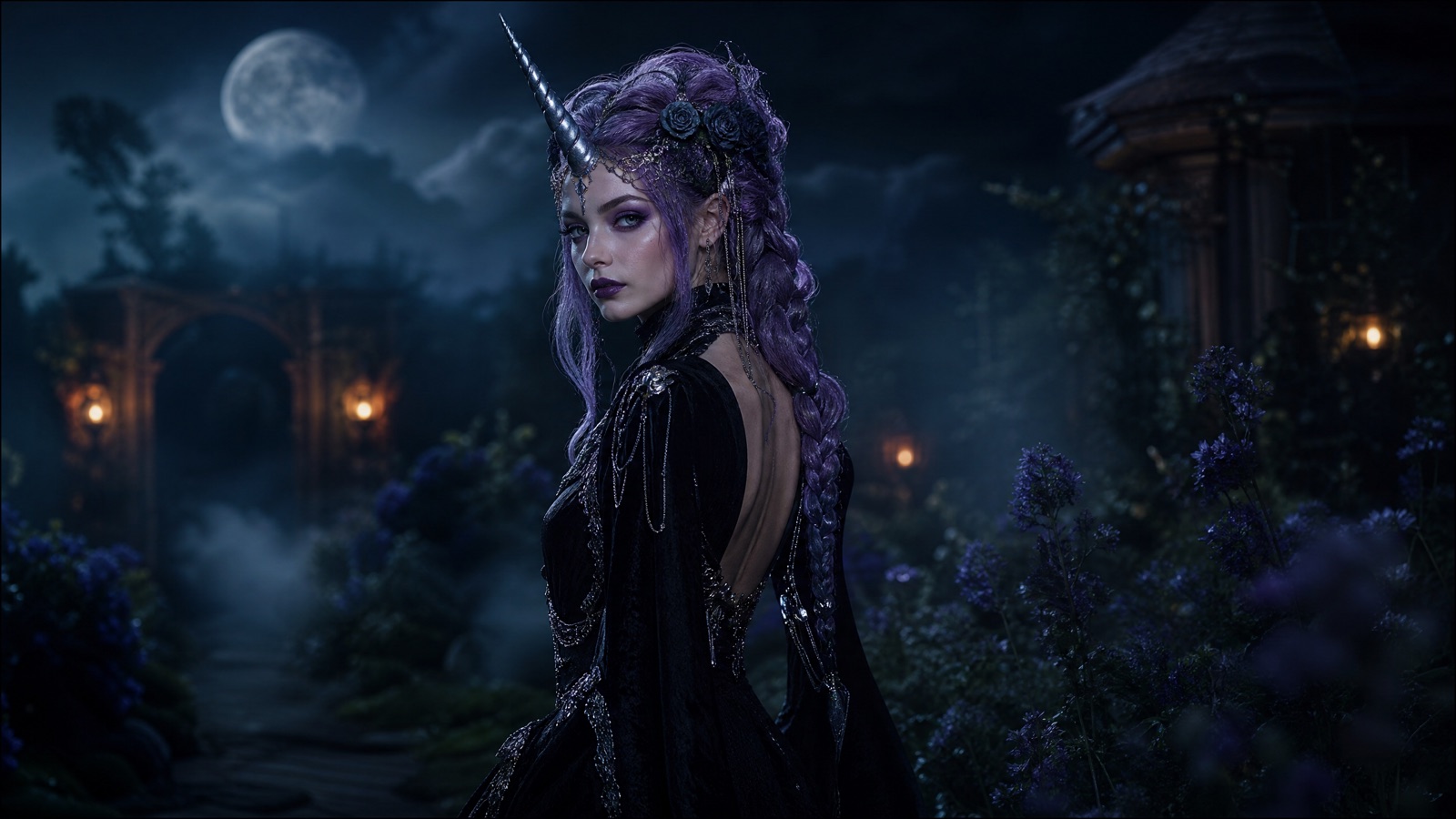
An original gothic unicorn-inspired look: a sculpted horn, violet braids, black velvet, and silver details. Not the movie character.
Halloween 2026 · Costume preview
Before you buy a costume, see the silhouette on your own photo. A good costume preview keeps your face recognizable, builds an original look, and shows how the outfit reads in real light. It is a concept tool, not a fitting room.
Upload a front-facing photo, preserve identity and body proportions, then describe one costume layer at a time: hair, outfit, accessories, background. Keep the result as a visual concept, not a promise of exact fit. Translate trend words into original looks instead of copying a copyrighted character.
Halloween 2026 falls on Saturday, October 31. Generate and review your looks before the weekend; model availability and credit prices can change.
One sharp, front-facing photo with even light
A costume concept that keeps your face recognizable
Nano Banana 2.1, GPT Image 2, Seedream 5.0, FLUX Kontext
Animate the look with the Halloween video workflow
Pick a preset, adjust the subject and scene, then copy the prompt. The optional photo preview stays in your browser: this page does not upload it. The generator is a separate site with its own terms and pricing.
Copying the prompt does not create an account or charge credits. The hosted generator opens a separate site with its own terms and pricing.
An original gothic unicorn-inspired look: a sculpted horn, violet braids, black velvet, and silver details. Not the movie character.
Long violet braids, delicate silver hair accessories, and a black-and-purple velvet outfit in a moonlit garden.
A midnight-blue gown with silver embroidery, softly glowing star patterns, and a delicate moon crown.
A wearable robot costume with metallic panels and subtle blue LEDs. The face stays human and recognizable.
Describe the shape and mood you want: horned mascot, braided antihero, glowing princess, retro robot. Original wording avoids copyright problems and gives the model more room.
Front-facing, even light, visible shoulders, no sunglasses. A good source keeps the face stable while the costume changes.
List face, skin tone, age, body proportions, pose, and the number of people. Only then describe the costume.
A moonlit garden, a candlelit hallway, or a studio backdrop. One light idea keeps the costume readable.
Use this structure as a checklist. Replace the bracketed fields, keep the protection lines, and remove anything that does not apply to your shot.
Use the uploaded photo as the primary reference.
Preserve: face, facial proportions, skin tone, age, body proportions, pose, and number of people.
Costume: [original look, materials, colors, accessories].
Scene: [location, time of day, atmosphere].
Camera and light: [portrait framing, key light, rim light].
Avoid: altered identity, extra people, extra limbs, distorted hands, text, logos, watermarks.These notes describe where each model tends to fit. They are not a ranking. Model availability changes by provider: WaveSpeed, SeeAPI, FAL, Replicate, and Kie all serve image and video models in this class. The hosted generator shows the available models and credit cost before you run a job.
| Model | Best fit |
|---|---|
| Nano Banana 2.1 | Reference-led costume edits that keep the face and body consistent. |
| GPT Image 2 | Detailed costume instructions and clean studio composition. |
| Seedream 5.0 | Fabric, metal, and skin texture in photoreal portraits. |
| FLUX Kontext | Targeted changes when only the outfit or background should move. |
The trend is a unicorn mascot, not a specific film character. Keep the silhouette and make the design your own.
Use the uploaded photo as the primary reference. Preserve the person's face, facial proportions, skin tone, age, body proportions, and pose. Create an original gothic unicorn-inspired costume: a sculpted silver horn, violet braids, black velvet, and delicate metallic details. Place the person in a moonlit garden with soft fog, dark autumn foliage, and warm lanterns. Three-quarter portrait, 50mm lens, eye level. Keep the face recognizable. No text, no logos, no watermarks.A hair-and-wardrobe change is easier to judge than a full-body costume. Start with the portrait, then extend to a full look.
Use the uploaded photo as the primary reference. Preserve the face, skin tone, age, and body proportions. Change the hairstyle to long violet braids with delicate silver hair accessories. Replace the outfit with an elegant black-and-purple velvet look with lace and metallic details. Moonlit Victorian garden, soft fog, glowing lanterns. Medium close-up, 85mm lens. Keep the same number of people. No text, no logos, no watermarks.Glowing details need a darker scene to read. Keep the face lit separately from the costume.
Use the uploaded photo as the primary reference. Preserve the face, skin tone, and body proportions. Create an original celestial princess look: a midnight-blue gown with silver embroidery, softly glowing star patterns, a silver moon crown, and luminous accessories. Moonlit observatory with a starry sky through tall windows. Full-body, 35mm lens, slight low angle. Keep the face recognizable. No text, no logos, no watermarks.Describe the silhouette and mood instead. Original wording is safer and often produces a more usable concept.
If the face changes, the preview stops being useful. Protect identity in the first sentence.
A horn, crown, wings, and a prop in one prompt fight for attention. Choose one hero accessory.
A dark or blurry selfie gives the model little identity information. Use a sharp, evenly lit photo.
This guide is free to read and the prompt studio runs in your browser. Generation happens in an image model or on Flash Omni, which may charge credits. Check the current price before you generate.
Yes, when you use a clear reference photo and put preservation instructions first. Review the eyes, teeth, and hairline before sharing.
A sharp, front-facing photo with even light and visible shoulders. Avoid sunglasses, heavy filters, and extreme angles.
Yes. Use the couple or pet workflow for a two-person or animal-specific prompt. Those pages protect multiple identities and animal anatomy.
Yes. Use the Halloween video workflow to add fog, candle flicker, or a slow push-in while keeping the costume and face consistent.
No. It is a concept, not a fitting room. Use it to compare silhouettes and colors, then check the real product's measurements and materials.
Open the hosted generator, paste the prompt, and run one short test. Keep the first generation small; a clean five-second clip is easier to judge than a long one.
Flash Omni is an independent guide and is not affiliated with Google. The hosted generator is a separate product with its own terms and pricing.